Dropshelf and Dropover alternatives for Windows
Dropover and Yoink only exist on the Mac. On Windows, a handful of shelf apps have shown up over the last few years: Dropshelf, several open-source projects, and PerchShelf. Here is how they differ and when each one is enough.
What these apps do
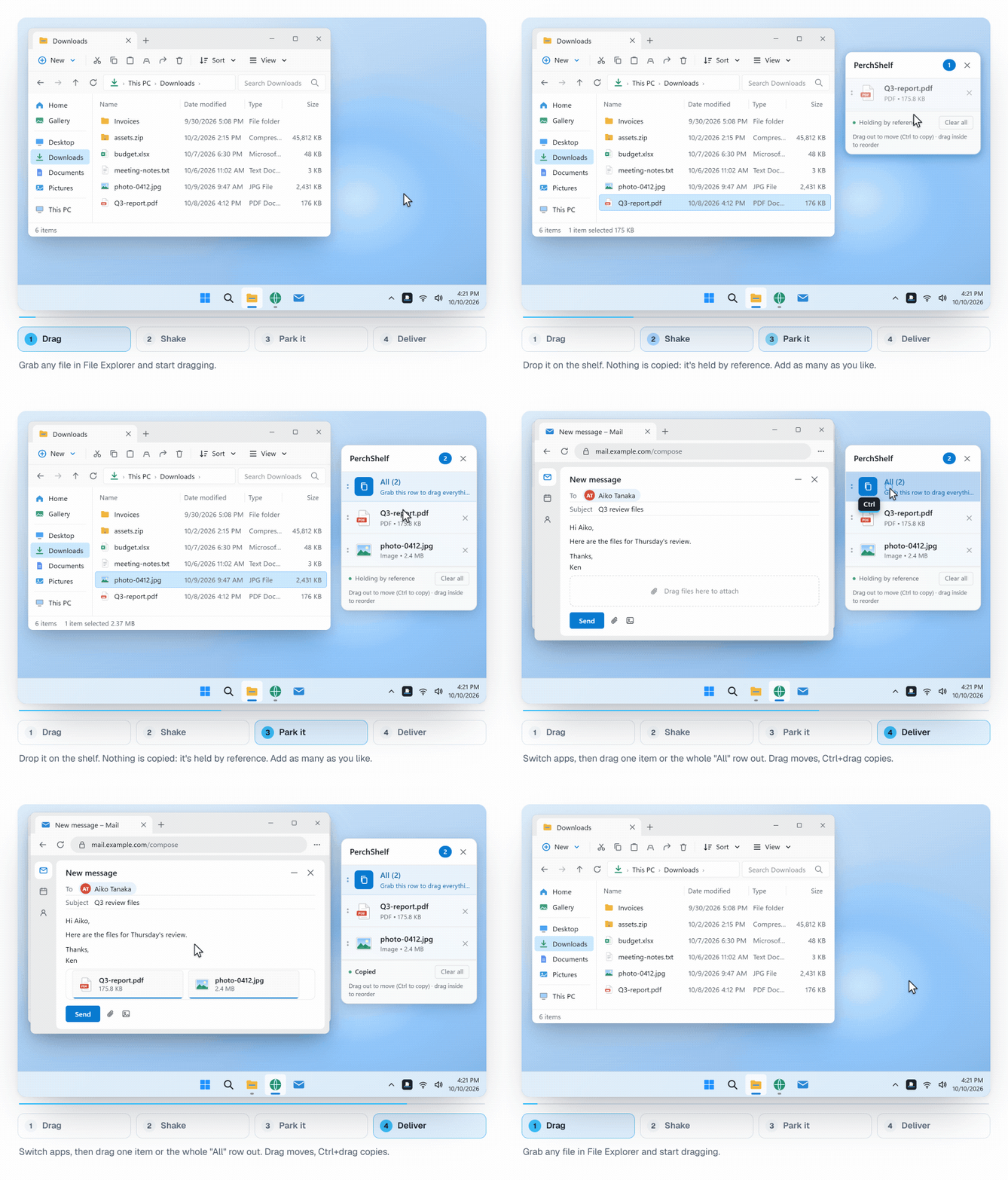
They all solve the same problem: you start dragging a file and the place you want to drop it is hidden. Instead of letting go and rearranging two windows side by side, you drop the file on a small shelf, find the target at your own pace, and drag it on from there. The differences are in how the shelf opens, what it costs, and what else besides files it can hold.
Windows shelf apps at a glance
| App | Platform | Price | Notable |
|---|---|---|---|
| Dropover, Yoink | macOS only | paid | The Mac originals. Not available on Windows. |
| Dropshelf | Windows 10 / 11 | free with a short wait, Pro is a one-time purchase of about 4 USD | In the Microsoft Store since 2023. |
| Open-source projects (e.g. DropPoint, Tokri, Edge Drop) | Windows, some also Linux / macOS | free | Features and maintenance vary a lot. Mostly installed from GitHub. |
| PerchShelf | Windows 10 / 11 | 30-day trial with every feature, then a one-time purchase, no subscription | Tabs, content from the browser, photos from your phone via QR code, UI in 7 languages. |
Prices from the Microsoft Store and project pages, October 2026. Dropshelf, Dropover and Yoink are trademarks of their respective developers. PerchShelf is an independent app.
When PerchShelf fits
- You collect from several places at once. Several shelves as tabs keep "for the report" and "for the client" apart. Dropping a file on + opens a new shelf, and dropping an item on another tab moves it there.
- It's not only files. Links, images and text from Chrome, Edge and other apps stay on the shelf too, and come back out as files, for example into an upload box in the browser.
- You want phone photos on the PC quickly. Since version 1.1: scan a QR code and the photos arrive on the shelf over your own Wi-Fi. No app on the phone, no account.
- Big files. The shelf only keeps a reference, nothing is copied. Videos and large archives land on the shelf instantly.
- You don't want to hand over data. No account, no telemetry, no internet connection needed.
When something else is enough
- If you only park a file now and then, a free app is probably fine.
- If you work on two monitors and always see source and target side by side, you may not need a shelf at all.
- If you want to read or modify the source code, the open-source projects are the better choice.
Switching takes two minutes
- Install PerchShelf from the Microsoft Store. On first launch a short guide shows the main moves.
- Drag a file and give the mouse a quick shake (or move to the screen edge). The shelf appears next to the pointer.
- To open the shelf without dragging: Ctrl+Shift+F, changeable in settings.
FAQ
Can I use Dropover on Windows?
No. Dropover and Yoink are macOS only. On Windows you need a separate app such as Dropshelf or PerchShelf.
Are files copied?
No. PerchShelf only remembers where the file is. Dragging it out moves it; hold Ctrl to copy.
Does PerchShelf run on Windows 10?
Yes, on Windows 10 and 11.
What happens after the trial?
A one-time purchase in the Microsoft Store unlocks every feature for good. There is no subscription.