Yoink and Dropover for Windows: PerchShelf
On the Mac, shelf apps like Yoink and Dropover let you park files halfway through a drag. They don't run on Windows. PerchShelf brings the same idea to Windows 10 and 11.
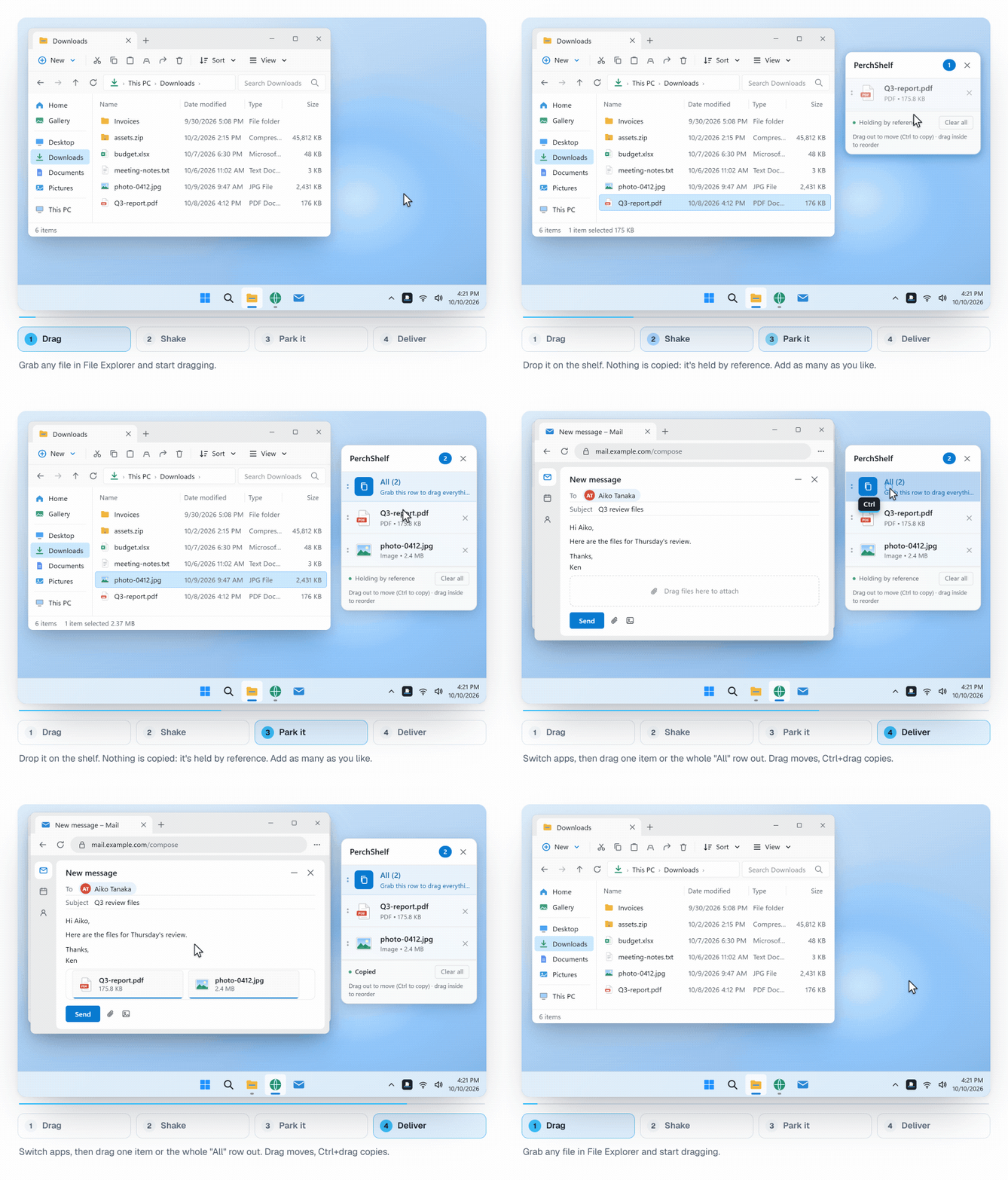
What a drag shelf solves
You start dragging a file and realise the destination folder isn't open yet. Normally you let go, open a second Explorer window, arrange both side by side and start again. With a shelf, you drop the file on a small panel next to the cursor, find the destination at your own pace, and drag it out from there.
How PerchShelf works
- While dragging, shake the mouse or move toward a screen edge. The shelf pops up beside the cursor.
- Drop files and folders on it. They are held by reference, so nothing is copied and large files land instantly.
- Links, images and text dragged from Chrome, Edge and other apps are kept too (links as shortcuts, text as a .txt file).
- Drag them out to Explorer, an email, a chat or an upload page. Drag moves, Ctrl+drag copies.
- Several shelves as tabs, a global hotkey (Ctrl+Shift+F), light and dark mode, seven UI languages.
- Hidden over fullscreen games and presentations, with per-app exclusions.
Mac shelf apps and PerchShelf at a glance
| Yoink / Dropover | PerchShelf | |
|---|---|---|
| Platform | macOS | Windows 10 / 11 |
| Summon the shelf mid-drag | Yes | Yes (shake or screen edge) |
| Holds files without copying | Yes | Yes |
| Where to get it | Mac App Store | Microsoft Store |
Yoink and Dropover are trademarks of their respective developers. PerchShelf is an independent app and is not affiliated with them.
Private and offline
PerchShelf works entirely on your PC. It has no account, no network access and no telemetry. See the privacy policy.
Price
The 30-day trial includes every feature. After that, a one-time purchase keeps every feature — no subscription.
Curious how the shake is detected? See Detecting a mouse shake during drag and drop on Windows.
Get PerchShelf from Microsoft Store