Detecting a mouse shake during drag and drop on Windows
PerchShelf shows a small shelf next to the cursor when you shake the mouse while dragging something. The shake itself is easy to detect. The hard part is that Windows never tells you a drag is happening, so the app has to work out, from the outside, whether the user is dragging a file or just selecting text.
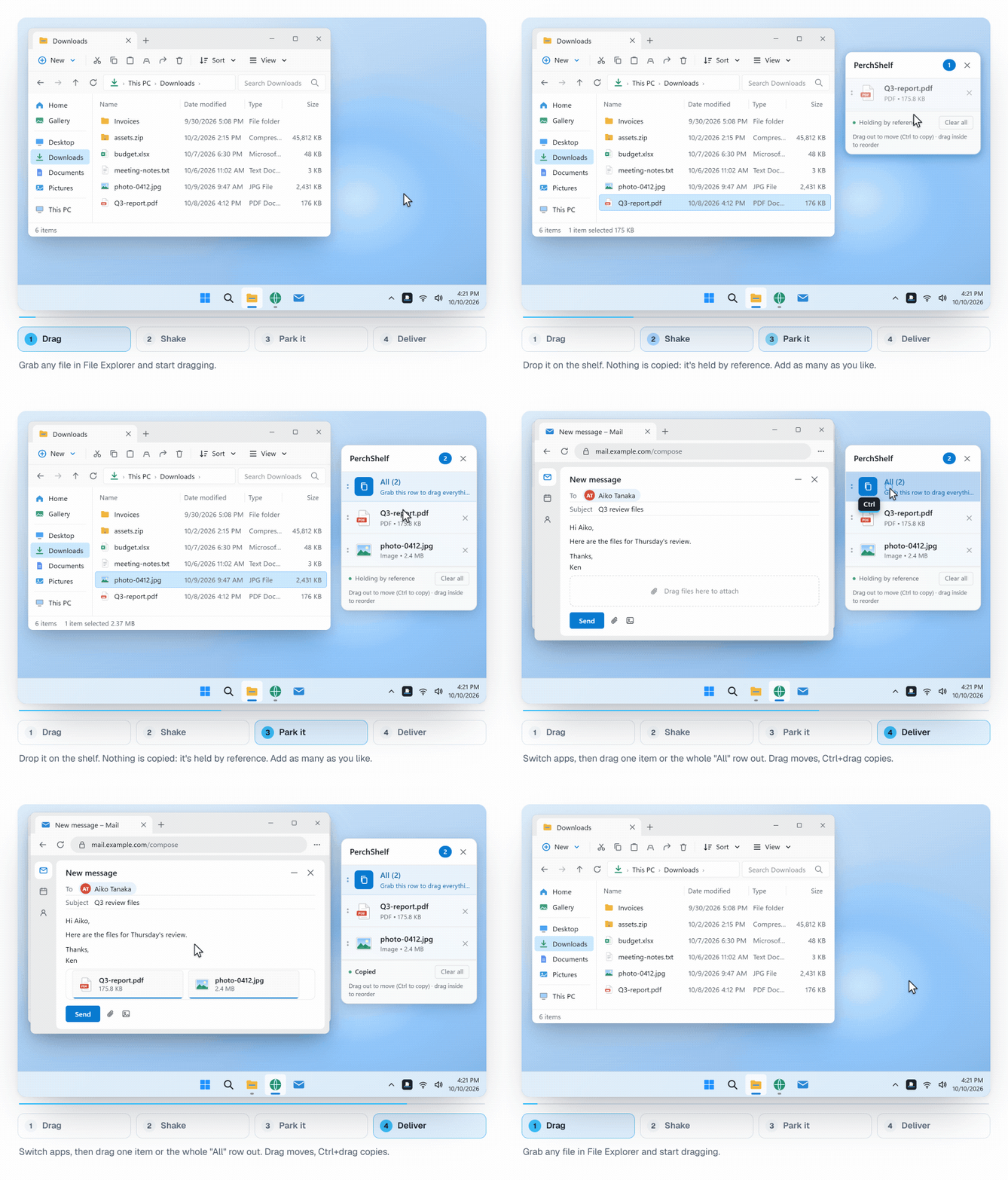
Windows has no "a drag started" event
OLE drag and drop is a conversation between a drag source and whichever drop target is under the cursor. A third program is not part of it. There is no system-wide notification that says "someone is dragging a file now". So PerchShelf splits the problem in two:
- Notice a gesture that might be a drag: the left button is down and the mouse is moving.
- Only when the user asks for the shelf (shake or screen edge), check whether it really is an OLE drag, and of what.
Step 1: a low-level mouse hook for the button state
A WH_MOUSE_LL hook sees WM_LBUTTONDOWN, WM_MOUSEMOVE and WM_LBUTTONUP for the whole desktop. That is all it is used for: it raises "potential drag started" on button down and "potential drag ended" on button up. Windows expects low-level hook callbacks to return quickly, so no gesture analysis happens inside the hook.
Once the cursor has moved 8 px from the button-down point, thin invisible windows along the chosen screen edges are shown. Each one is registered as an OLE drop target. They exist only while the button is held, so they never swallow an ordinary click at the edge of the screen.
Step 2: counting strokes, not wiggles
While the button is down, a timer samples GetCursorPos about every 16 ms and keeps the last 800 ms of movement. A shake is then defined as:
- Strokes, not samples. Horizontal motion is split into runs in one direction. A run only counts as a stroke if it travels at least 30 px (20 / 40 px on the high and low sensitivity settings), and horizontal deltas under 5 px are ignored, so hand tremor cannot split a stroke.
- Enough reversals. Three direction changes, which means four solid strokes inside the 800 ms window.
- Mostly horizontal. Total horizontal travel must be at least twice the vertical travel, so circling the mouse or moving it diagonally does not count.
- Not too early. The button must have been down for at least 250 ms, which filters out quick click-and-flick motions.
// N reversals = N+1 solid strokes, and the gesture must be mostly horizontal
return strokes >= ShakeThreshold + 1 && totalHMovement >= totalVMovement * 2;
Step 3: an invisible drop target as a probe
A shake with the button down still says nothing about what is being dragged. It could be a file, but it could just as well be a text selection, a window being moved, or a scrollbar thumb. Showing the shelf in those cases would be the fastest way to get the app uninstalled.
The trick is to let OLE answer the question. When a shake is detected, PerchShelf places a 96 × 96 px invisible window, registered as an OLE drop target, centred under the cursor. If an OLE drag is in progress, the drag source immediately calls DragEnter on it with the data object, and the probe can look at the formats: files, a link, an image, or text. If nothing calls DragEnter within 600 ms, it is not a drag, and the probe hides itself so it cannot block other drop targets.
Only after DragEnter confirms a real drag does the shelf appear, and it takes over as the drop target right where the probe was.
Small rules that removed most false positives
- Text only on a shake. Dragging a block of text inside an editor near the screen edge is common, so the edge strips accept files, links and images, but text is accepted only on a deliberate shake.
- Decide once per gesture. Whether a fullscreen game, a presentation or an excluded app is in front is checked once, when the cursor first moves far enough to count as a drag, not on every mouse move.
- Always clean up on button up. However a drag ends (dropped, dropped on nothing, or cancelled with Esc), the button eventually goes up, so that is where the edge strips and the probe are hidden and the drag state is reset. Without this, one cancelled drag could leave the detector stuck.
Why not just watch the clipboard or Explorer?
Drag and drop does not go through the clipboard, and watching Explorer would miss drags from browsers, mail clients and every other app. The OLE probe works for any drag source that uses standard OLE drag and drop, which covers Explorer, browsers and most other apps, and it needs no injection into other processes.
PerchShelf is a drag-and-drop shelf for Windows 10 and 11, like Yoink or Dropover on the Mac. It works offline, collects nothing, and has a 30-day trial on the Microsoft Store. More about it on the home page or in Yoink / Dropover for Windows.