Mac to Windows: Mac features and their Windows 11 equivalents
If you use a Mac at home and a Windows PC at work, your hands keep reaching for things that are not there: Space shows no preview, Cmd+Space opens no search, and there is no shelf to park files on. Windows 11 has much of this built in, Microsoft's PowerToys add more, and small apps cover the rest. Here is the list.
At a glance
| On the Mac | On Windows 11 |
|---|---|
| Quick Look (Space) | PowerToys Peek, default Ctrl+Space |
Spotlight (Cmd+Space) | Windows search (press Win and type) or the PowerToys Command Palette |
| Yoink, Dropover (shelf while dragging) | Not built in. A shelf app such as PerchShelf |
| Mission Control | Task View, Win+Tab |
| Window tiling (Rectangle, Magnet) | Snap: Win+arrow keys, layouts with Win+Z; custom zones with PowerToys FancyZones |
Screenshot (Cmd+Shift+4) | Snipping Tool, Win+Shift+S |
Emoji (Ctrl+Cmd+Space) | Win+. |
| AirDrop from an iPhone | Not built in. See below |
Quick Look: preview with the space bar
File Explorer has a preview pane (Alt+P), but it is fixed to the side of the window. Closer to Quick Look is Peek from PowerToys: select a file, press Ctrl+Space, and a preview window shows images, PDFs, videos and text files. You can change the shortcut in the PowerToys settings. PowerToys is in the Microsoft Store.
Spotlight: find apps and files
Press the Win key and start typing; that is the built-in search. For a faster launcher with a calculator and extensions, use the Command Palette in PowerToys.
Yoink and Dropover: a shelf while you drag
On a Mac, Yoink or Dropover let you drop files on a shelf mid-drag, switch windows, and drag them on from there. Windows has nothing like it built in, and PowerToys does not either. The usual workaround is a temporary folder on the desktop.
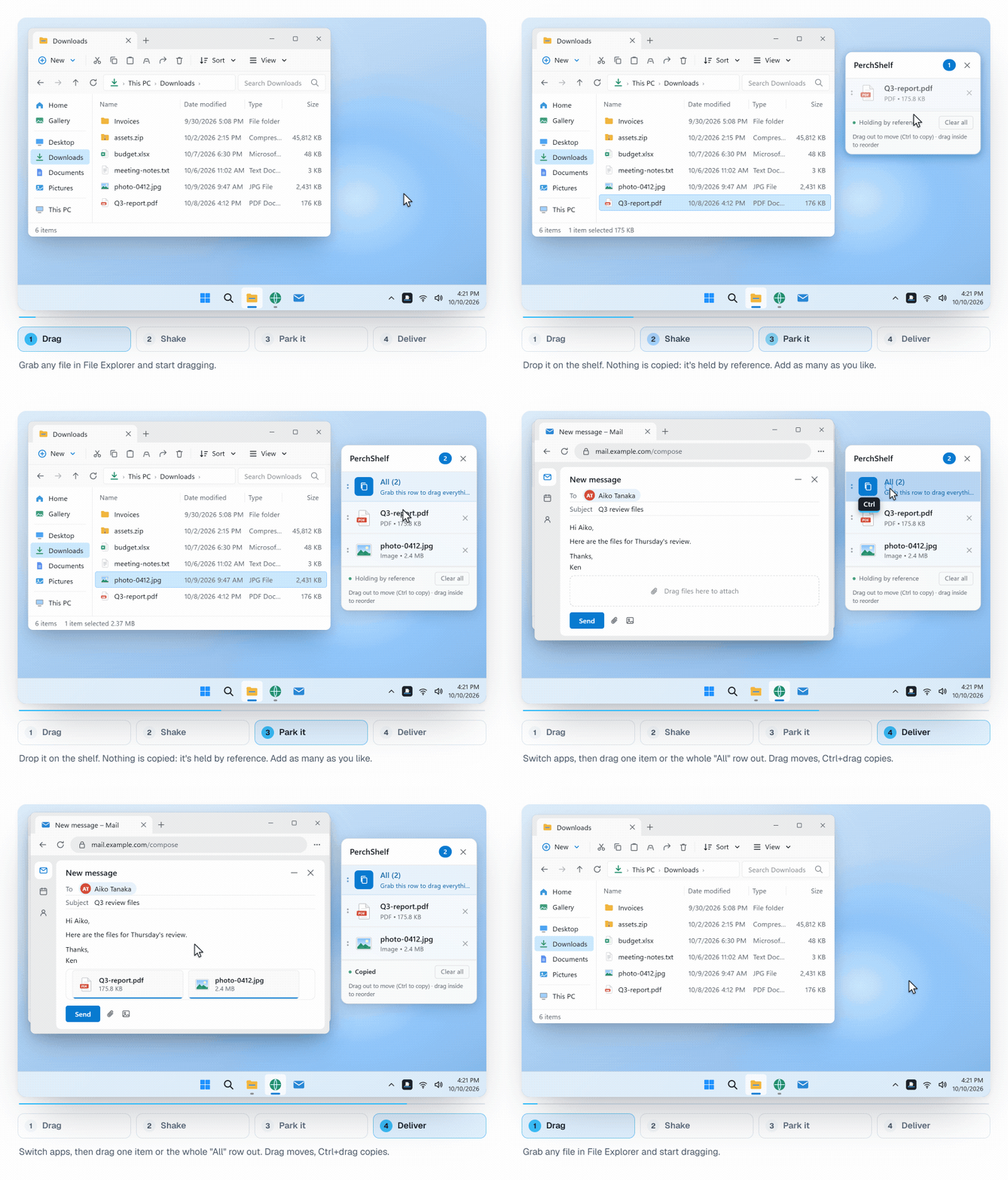
PerchShelf is a shelf of this kind for Windows 10 and 11:
- Drag a file and give the mouse a quick shake. The shelf appears next to the pointer, and you let go of the file there.
- Later, drag it off the shelf into a folder, an email or an upload dialog. Several files at once with the "All" row.
- It also works without dragging: right-click in Explorer, "Send to PerchShelf".
- Images, links and text from the browser can go on the shelf too.
How PerchShelf compares with the Mac apps is on the page Yoink / Dropover for Windows.
Get PerchShelf from the Microsoft Store30-day trial, then a one-time purchase. Windows 10 and 11.
Mission Control and desktops
Win+Tab shows all open windows and your virtual desktops. Create a desktop with Win+Ctrl+D and switch with Win+Ctrl+left/right arrow. Touchpad gestures work too: three fingers up for Task View, four fingers sideways to switch desktops (set them under Settings › Bluetooth & devices › Touchpad).
Window tiling
What Rectangle or Magnet do on a Mac is built into Windows: Win+left/right arrow snaps a window to half the screen, and Win+Z opens Snap layouts. Build your own grid with FancyZones in PowerToys.
Cmd versus Ctrl
The hardest part is often muscle memory: copy is Ctrl+C, not Cmd+C. If you use a Mac keyboard or want the layout to match, remap keys with the Keyboard Manager in PowerToys.
Photos from an iPhone to a Windows PC
There is no AirDrop on Windows. Ways without iCloud and without a cable are in Transfer iPhone photos to a Windows PC.
Summary
- Window overview, Snap, screenshots and emoji are built into Windows 11.
- Quick Look, a Spotlight-style launcher and key remapping come with PowerToys.
- A shelf like Yoink or Dropover is in neither; apps such as PerchShelf fill that gap.
PerchShelf is a drag-and-drop shelf for Windows 10 and 11. Photos from your phone arrive on it by QR code (how that works). It works offline, collects nothing, and has a 30-day trial on the Microsoft Store, then a one-time purchase.